Posts

Showing posts with the label Nokia

Nokia N9 PR1.3 update
Image
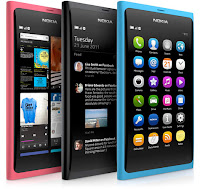
The much awaited update landed on my own N9 yesterday. At first sight there's nothing really new in it despite Nokia's surprisingly undetailed claims of over 1000 improvements in various areas (see here ). As far as I can see there are only 3 visual changes, but it goes a little deeper than that. Read on... Firstly, there is now a small status icon that appears when the phone's "beep" profile is selected (see photo to the right, screenshot of the top-right corner of the display). Previously, there was only such an icon when the phone was in silent mode, a similar musical note with a bar through it. Secondly, the UI seems to be a bit more fluid. Scrolling through photos in the gallery, entries in the music player or tweets in the twitter app seems less jerky than previously. Finally, there has been some improvement to the camera. Focussing seems to be improved, as does the camera's ability to function in poor lighting conditions. The ...

Flickr account on a Nokia N9

Image
Since writing this, I have found a "solution" to the problem. "Solution" in quotes because it is merely a work-around and doesn't actually solve the underlying problem. All I did was install firefox , set it as the default browser and start over with the procedure described below. Here's one that has me stumped. Rest assured, if I do get an answer to this problem I'll publish it here so that other people coming up against the same problem can find help. The nature of the problem is quite simple: it is seemingly impossible to set up my flickr account on this phone. Flickr apparently uses an oAuth system similar to that of twitter, whereby the client application (the built-in flickr client in the N9 in this case) contacts the flickr API saying "I want permission to access your services". The flickr API then prompts the user (me) to log in and grant the client this permission, in response to which, the API returns a token to the client. In...

Nokia N9 and CalDAV on Google

Image
Wow! It's some 18 months since I last published anything here! Time to add a quick article that puts in one place the results of something I was looking at last night. The idea here is to synchronise your Google calendar(s) with your N9 (and presumably N950 since they both run MeeGo Harmattan), which isn't that hard in itself. What caught me out and had me searching was how to sync all my Google calendars with the phone. Single calendar In its most basic form, this system allows you to sync just your main Google calendar with a mobile device. On your phone, go into "Accounts" and start setting up a new CalDAV account: Fill in your Google e-mail address (eg. your.name@googlemail.com) and your Google account password, and in the "Server/URL" field enter: https://www.google.com/calendar/dav/ Tap on the "Sign in" button and you will be presented with a page allowing you to set up the scheduling (just like with any synchronised account)...

Nokia OVI Suite and marking SMS messages read

Image
Wow! Nearly 8 months have gone by since the last post I made on this blog. Those of you who know me offline will also know that life has been a bit of a rollercoaster for about 6 months, which kind of explains the lack of activity both here and on my other blog . So here goes... How many of you have become irritated at Nokia OVI Suite's stubborn refusal to mark as read text messages that you have, well... read? Am I the only one? You can click wherever you like on a message marked as unread and nothing will change that status. I'd read posts elsewhere that sugessted sorting the list of messages by date rather than grouped by contact but even that didn't work. The only thing left to do was to go into the message database and change the status of the messages manually. For this, go and grab yourself a copy of SQLite Expert available from sqliteexpert.com . The free, "personal" version will work fine for this, although I'm sure the author would appreciate you pur...

Nokia E72 firmware version V51

Nokia released a major update for the E72 handset in September 2010. The previous version was V31, so V40 and V50 weren't even released to the public. According to many online resources there are something like 450 bugfixes in V51. There are also some new features that some people would consider to be bugs, and curiously enough, some pieces of software appear to have been down graded between versions V31 and V51. V51 is currently available via Nokia Software Updater and as Firmware-over-the-air. There are various sources of information on the internet listing things that are supposed to have changed. What I'd like to do here is give you an idea of what the new firmware feels like, which is something you can't put on paper. Visually, very little has changed. To be honest, the only difference I've noticed is a smaller clock at the bottom of the screen. People who tend to use the keypad to select elements in the phone's menus will be pleased to hear that the '7...

WOMWorld/Nokia "Experiences"

Image
WOMWorld/Nokia have recently unveiled their "Experiences" page. It offers a view of the devices they currently have out on loan and the cities where said devices are currently being evaluated. Privacy concerns mean that the devices are mapped only to the city where they've been sent, not to the actual address of the person trying the device out. For example, as of writing this, there's the indication of an N900 (the one sitting next to me on the arm of my sofa) in Bolton when in actual fact I am in Horwich, which is a few miles West of Bolton. WOMWorld/Nokia Experiences I'm not sure exactly what the purpose of this is but hey, it's fun, right? It certainly seems to fit in with the current craze for location-based services such as OVI location sharing, geotagging on twitter, Google Buzz etc. Speaking of the N900 I have here, I still have just over a week to evaluate it. I'll digest my findings and report back shortly thereafter.

Nokia E72: review

Image
On Friday (22/01/10) I took delivery of a Nokia E72 handset on loan from Nokia so that I could test-drive it and write this review. The whole thing could in fact be summed up in three words: "I want one". That is not, however, particularly helpful for other people so I'll go ahead and give you the longer version as well... To get an idea of the perspective from which I'm writing this mini-review, bear in mind that I'm a long-ish term Nseries user having worked my way through an N73, N95 and N96, and my current phone is a 5800 XpressMusic (which really is an Nseries phone in all but name). I don't have much use for several of the business-related features of the E72 (such as VPN and printing, for example) and won't cover them here. There are also some of the features I used to use on the N95 that disappeared from the N96 and 5800XM but have reappeared on the E72. These features mean enough to me for me to be willing to compromise on the multimedia side of t...

Free navigation with OVI Maps!

Image
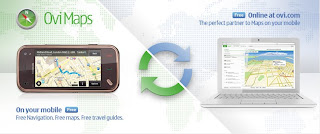
On the morning of January 21st 2010, Nokia announced that turn-by-turn navigation would be free for all to use on their Nokia handsets. Until now, the OVI Maps software (formerly known as Nokia Maps) was free to use for finding your current position and managing locations, but obtaining step-by-step directions from one location to another with vocal prompts was subject to the purchase of a navigation licence. The roll-out of free navigation is not yet global. The ability to use it is subject to installing OVI Maps V3.03, which is not yet ported to all models. As of writing, the models supported are: 5230, 5800 XpressMusic, 5800 Navigation Edition 6710 Navigator, 6730 classic, X6 E52, E55, E72, N97 mini Current speculation is that this new version of OVI Maps will be embedded in the V21 firmware update of the N97 that is due to be released later this month. It is also thought that OVI Maps V3.03 is the reason why the V21 update, originally announced for December 2009, was delayed. Visit...

Nokia 5800 XpressMusic V40 firmware update

Image
What better way to kick off the New Year's blogs than with the announcement of a great firmware update from Nokia? This article could be subtitled "Give Credit Where Credit Is Due" because V40.0.005 does seem to be the result of a productive effort from Nokia's software development team. They have evidently been listening to customers' concerns because the timer-related bugs that were introduced in V30 and V31 are gone and new features that many people were demanding have been introduced. In short, it took them long enough but they got this one right in my opinion. Nokia considers changelogs to be confidential information, so you'll never find one except when it's leaked on unofficial sites, but bear in mind that they more than likely contain inaccuracies deliberately introduced by Nokia in order to identify the mole leaking them. The information here is therefore based solely on personal observation. There may be features I've overlooked because I nev...

Will my mobile operator bill me for using WiFi?

Image
While people will often be dismissive and give answers like "of course not, you idiot", there's more to it than at first sight. Before an answer can be given for this question, you need to ask yourself who is providing the WiFi. There are three possibilities here: 1) You! This is probably the only case that most people think of when they're giving a dismissive answer. In this setup, you're using a wireless router or a wireless access point to distribute your home broadband internet among several devices such as your desktop computer, laptop, possibly a wireless VoIP phone, and your WiFi-enabled mobile phone. In this instance, your mobile phone is just another device connected to your wireless home network. Any data usage is already paid for in your broadband internet bill. While we all know that mobile network operators would love to bill you even just for thinking about using the phone, they have no way of knowing that you're using your own wireless network a...

Firmware availability and distribution

This is an area where there's a huge amount of confusion. With any luck this article will clear a certain amount of it up. Broadly speaking, there are two types of each model of phone. It's actually far more complicated than that with regional variants, promotional offers etc., but let's keep it simple for the moment. On the one hand, you have the phone as it was originally designed by Nokia and containing Nokia's firmware. On the other hand you have phones that are distributed not directly by Nokia or their retailers but by mobile network operators. In the latter case, the firmware installed in these phones is modified by the network operator to include their logo, links to their services and a few custom features and settings. Occasionally, network operators will also deactivate features of the original phone that they don't want you using. AT&T come straight to mind with their paid-for voice dialling service − the phone already has such a feature built in but...

So, what's up with the flashing envelope?

Older mobile phones would store received text messages on your SIM card rather than in their own (very limited) memory. Service messages sent to you by your mobile provider are also stored on the SIM card, even today. Modern phones store inbound text messages in their own (significantly more capacious than their predecessors') memory or even, in some cases, on a removable memory card (miniSD or microSD most of the time). Nokia phones based on S60v3 with feature pack 2 and later (N78, N96, 5800 XpressMusic, N97 etc.) detect messages on the SIM card and, if they find any, alert the user to their presence by displaying a flashing envelope on the screen. The only way to get rid of it is to delete the messages on the SIM card. To achieve this: Menu > Messaging > Options > SIM messages Select all the messages visible here: Options > Mark/unmark > Mark all Then delete them by pressing the "C" key for phones that have it (keypad-operated phones) or by tapping ...

My language has disappeared from my phone! How do I get it back?

A problem frequently seen on the Nokia Support Discussion forums relates to people who have just had to reset their phones or who have just updated their firmware. Upon restarting the phone, they are faced with a problem in that their language has disappeared! Actually, the problem goes much deeper than that. The language disappearing is merely the visible part of willful deceit on the part of some rogue retailers. Nokia phones are sold all over the world. It is unreasonable to expect them all to "speak" all the languages of the world, so, depending on which part of the world each individual batch of phones is intended for, it will have a particular set of languages installed. For example, phones sold in Western Europe have English, French, German, Spanish, Portuguese, Italian and sometimes Dutch languages installed. Those sold in Nokia's home country, Finland, have English, Finnish, Swedish, Norwegian and Danish. I'm going to use the examples of Malaysia and Arabic ...

PIN code, PUK code, security code, lock code, unlock code, restriction code...

Clearly, there's alot of confusion out there as to what all these codes do, what they protect, how to get them and how to manage them. I'd like to clear that confusion up a litle bit with this article. The first thing you have to bear in mind is that your SIM card is actually the property of your network operator. SIM stands for "Subscriber Information Module". Stored in it is information that identifies you as the user of the phone in which the SIM is installed, and which ties that phone to your mobile phone number. Proof of this is if you swap SIMs with another phone and call your number it's the other phone that will ring, and if you place a call with your phone it's the other phone's owner who will be billed! The PIN, or "Personal Identification Number" is a 4-digit code (well, actually, some phones allow up to 8 digits but it is nearly always 4 digits), stored in encrypted form in the SIM and which protects your SIM from unauthorised use. Th...

Should I buy a phone SIM-free and pay the full price for it, or should I get it on the cheap with a contract?

In Europe, the overwhelming majority of mobile phones in circulation are phones that were supplied to the users with a contract or pay-as-you-go SIM, up to 90% in the UK and probably similar figures elsewhere in Europe. In the Far-East, however, things are the other way round. Most people buy their phones directly from the manufacturer's outlets or from third-party retailers and get just the line and communications from the mobile network operator. The aim of this small article is to outline the pros and cons of each method so that you can make an informed choice based on budget and on your thirst for a regular technology fix. Initial cost: This is about the only area where a contract phone wins hands down. Many operators will have huge flashy signs all over the place touting a "free" phone with the contract. Of course, the phone isn't free at all, you're paying for it over the duration of your contract, but you have no initial expense over the cost of your contra...