Posts

Nokia E72 firmware version V51

Nokia released a major update for the E72 handset in September 2010. The previous version was V31, so V40 and V50 weren't even released to the public. According to many online resources there are something like 450 bugfixes in V51. There are also some new features that some people would consider to be bugs, and curiously enough, some pieces of software appear to have been down graded between versions V31 and V51. V51 is currently available via Nokia Software Updater and as Firmware-over-the-air. There are various sources of information on the internet listing things that are supposed to have changed. What I'd like to do here is give you an idea of what the new firmware feels like, which is something you can't put on paper. Visually, very little has changed. To be honest, the only difference I've noticed is a smaller clock at the bottom of the screen. People who tend to use the keypad to select elements in the phone's menus will be pleased to hear that the '7...

WOMWorld/Nokia "Experiences"

Image
WOMWorld/Nokia have recently unveiled their "Experiences" page. It offers a view of the devices they currently have out on loan and the cities where said devices are currently being evaluated. Privacy concerns mean that the devices are mapped only to the city where they've been sent, not to the actual address of the person trying the device out. For example, as of writing this, there's the indication of an N900 (the one sitting next to me on the arm of my sofa) in Bolton when in actual fact I am in Horwich, which is a few miles West of Bolton. WOMWorld/Nokia Experiences I'm not sure exactly what the purpose of this is but hey, it's fun, right? It certainly seems to fit in with the current craze for location-based services such as OVI location sharing, geotagging on twitter, Google Buzz etc. Speaking of the N900 I have here, I still have just over a week to evaluate it. I'll digest my findings and report back shortly thereafter.

Vodafone Access Gateway femtocell

Image
Or, How To Spend Lots Of Money And Then Pay For Your Mobile Calls Twice There's no denying that this product can be of use if you're in the unfortunate position of needing 3G coverage from Vodafone UK and from no other operator. If this is the case and you have a decent enough broadband connection then this product will certainly fit the bill. There is, however, a more sinister side to it in that the business model used to place it on the market do leave a little to be desired. Let me elaborate... What is a femtocell and how does it work? You know those mobile phone towers that everybody wants near enough to have great mobile phone coverage but not in their own back yard? This is one of those that's been very much scaled down both in size and in terms of power output. A big, outdoors mast has its radio tranceivers on the top and equipment in the cabinet at the foot of the mast to connect the signals directly to the operator's backhaul network. This one here has tiny tra...

Nokia E72: review

Image
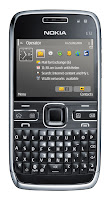
On Friday (22/01/10) I took delivery of a Nokia E72 handset on loan from Nokia so that I could test-drive it and write this review. The whole thing could in fact be summed up in three words: "I want one". That is not, however, particularly helpful for other people so I'll go ahead and give you the longer version as well... To get an idea of the perspective from which I'm writing this mini-review, bear in mind that I'm a long-ish term Nseries user having worked my way through an N73, N95 and N96, and my current phone is a 5800 XpressMusic (which really is an Nseries phone in all but name). I don't have much use for several of the business-related features of the E72 (such as VPN and printing, for example) and won't cover them here. There are also some of the features I used to use on the N95 that disappeared from the N96 and 5800XM but have reappeared on the E72. These features mean enough to me for me to be willing to compromise on the multimedia side of t...

Free navigation with OVI Maps!

Image
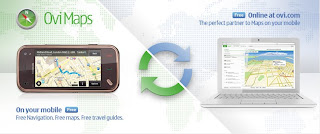
On the morning of January 21st 2010, Nokia announced that turn-by-turn navigation would be free for all to use on their Nokia handsets. Until now, the OVI Maps software (formerly known as Nokia Maps) was free to use for finding your current position and managing locations, but obtaining step-by-step directions from one location to another with vocal prompts was subject to the purchase of a navigation licence. The roll-out of free navigation is not yet global. The ability to use it is subject to installing OVI Maps V3.03, which is not yet ported to all models. As of writing, the models supported are: 5230, 5800 XpressMusic, 5800 Navigation Edition 6710 Navigator, 6730 classic, X6 E52, E55, E72, N97 mini Current speculation is that this new version of OVI Maps will be embedded in the V21 firmware update of the N97 that is due to be released later this month. It is also thought that OVI Maps V3.03 is the reason why the V21 update, originally announced for December 2009, was delayed. Visit...

Nokia 5800 XpressMusic V40 firmware update

Image
What better way to kick off the New Year's blogs than with the announcement of a great firmware update from Nokia? This article could be subtitled "Give Credit Where Credit Is Due" because V40.0.005 does seem to be the result of a productive effort from Nokia's software development team. They have evidently been listening to customers' concerns because the timer-related bugs that were introduced in V30 and V31 are gone and new features that many people were demanding have been introduced. In short, it took them long enough but they got this one right in my opinion. Nokia considers changelogs to be confidential information, so you'll never find one except when it's leaked on unofficial sites, but bear in mind that they more than likely contain inaccuracies deliberately introduced by Nokia in order to identify the mole leaking them. The information here is therefore based solely on personal observation. There may be features I've overlooked because I nev...

Will my mobile operator bill me for using WiFi?

Image
While people will often be dismissive and give answers like "of course not, you idiot", there's more to it than at first sight. Before an answer can be given for this question, you need to ask yourself who is providing the WiFi. There are three possibilities here: 1) You! This is probably the only case that most people think of when they're giving a dismissive answer. In this setup, you're using a wireless router or a wireless access point to distribute your home broadband internet among several devices such as your desktop computer, laptop, possibly a wireless VoIP phone, and your WiFi-enabled mobile phone. In this instance, your mobile phone is just another device connected to your wireless home network. Any data usage is already paid for in your broadband internet bill. While we all know that mobile network operators would love to bill you even just for thinking about using the phone, they have no way of knowing that you're using your own wireless network a...